
Most of the work in this tutorial is done by an AI agent, and an agent works only as well as the place it is given to work in. Before any article is searched, the researcher decides what the review covers, and sets up two places that the agent and the researcher share. One is a Zotero library where the articles live. The other is a folder where every step of the agent's work is written down.
Section 1The design of the review
The worked example asks how the economies of North Korea, China, and Vietnam were transformed after socialism. That question can be searched in three ways. A general search uses terms about post-socialist transformation alone. An area search attaches a country to each term. A combined design runs both. The researcher chose the combined design, as one pooled review with four searches, one general and one for each country. The agent recorded the choice as an approval gate on 10 October 2026, and every later step reads it from the review's configuration file.
| Option | Search terms | Searches | Chosen |
|---|---|---|---|
| General | general terms only | 1 | |
| Area | terms prefixed with a country name | 1 per country | |
| Combined | general terms and each country set | 4 (general, North Korea, China, Vietnam) | Yes |
Every later number depends on the design. The design sets how many search terms are needed, which journal lists are compiled and how the results are tagged. Changing it after the searches have run means running them again, so the agent stops and asks for approval before it goes further.
Section 2The Zotero group library
The articles live in a Zotero group library, so that the researcher, assistants and the agent all see the same records. The agent writes to the library through the Zotero web API, and people add to it through the Zotero desktop application and the browser Connector. Inside the group, one collection holds the review, and its subcollections are numbered in the order the work fills them.
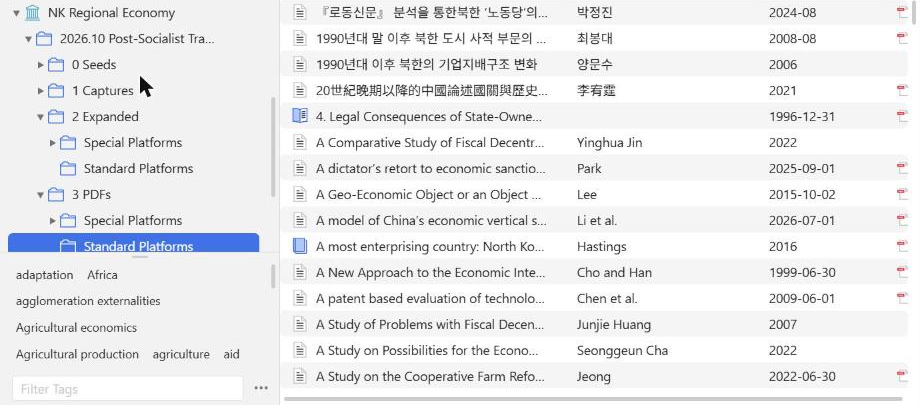
| Collection | Holds | Filled in |
|---|---|---|
| 0 Seeds | the articles that define the review, one subcollection per search | Step 1 |
| 1 Captures | results saved by hand from databases the agent cannot search | Steps 2 and 3 |
| 2 Expanded | the selected corpus, read by title and abstract | Step 5 |
| 3 PDFs | the part of the corpus chosen for full reading, with PDFs | Step 5 |
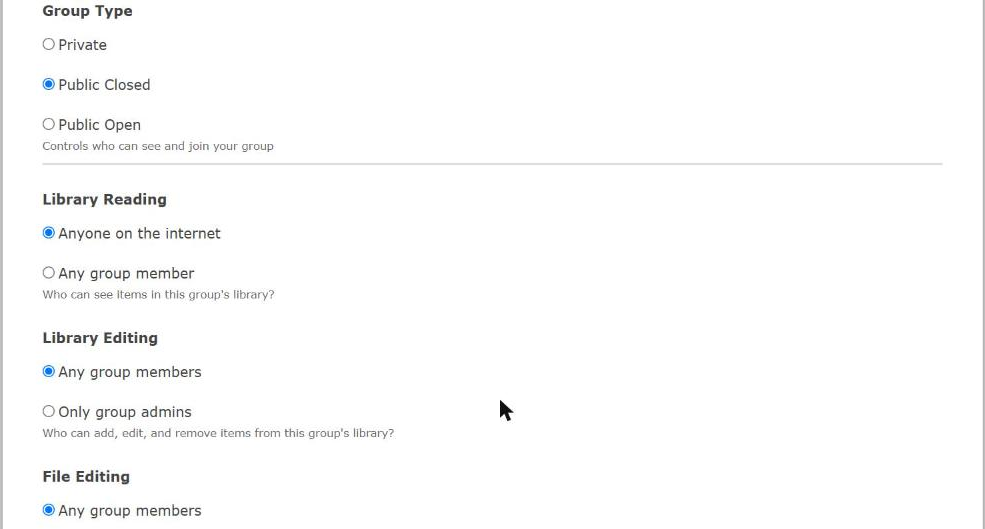
Group settings decide who can read and change the library. The worked example uses a closed group whose library anyone can read, so that the corpus can be cited and shared, while only members can add, edit or attach files.
Section 3The review workspace
The review also has a folder on disk, synchronised to a shared drive. The agent works in a subfolder, 1 AI Workspace, where every run of every step gets its own numbered folder. Each step folder holds the step's outputs and a small record, step.json, that names the skill that ran, its inputs, its outputs with their checksums, and when it started and finished. When a step is run again, the new run gets a new number and the old one is kept, so that any number in the review can be traced to the run that produced it.
2026.10 Post-Socialist Transformation/
├── 1 AI Workspace/
│   ├── review_config.json          # design, searches, weights, cutoffs
│   ├── orchestrator_state.json     # stages, approval gates, current step
│   ├── 00_seed-intake/             # Step 1
│   ├── 02_derive-search-terms/     # Step 2
│   ├── 03_search-journals/         # Steps 2 and 3
│   ├── 06_prepare-comparison-corpus/
│   ├── 07_score-keyword-results/   # Step 3
│   ├── 08_extract-citations/       # Step 4
│   ├── 09_score-extracted-references/
│   ├── 16_select-articles/         # Step 5
│   ├── …
│   └── 40_publisher-links/
├── 2 Expanded Corpus/              # export of the Zotero collection 2 Expanded
├── 3 PDFs/                         # export of 3 PDFs, with PDFs and full texts
└── 4 Analysis/ # Literature Review II writes hereSection 4The agent and its skills
The worked example used a desktop coding agent with a set of written skills, one for each kind of task. A skill is a short instruction file, with scripts where needed, that tells the agent how to do one job and when to stop for approval. One skill runs the review as a sequence of stages and keeps the state file. Others compile journal lists, run the searches, score articles, file them in Zotero, find PDFs through the library and export the corpus. The researcher talks to the agent in plain language, and the agent answers with a proposal, a table or a page to review.
- 1Install Zotero and the ConnectorThe desktop application and the browser Connector, signed in to an account that belongs to the group.
- 2Create the group and the collectionsOne collection for the review, with 0 Seeds, 1 Captures, 2 Expanded and 3 PDFs beneath it, as in Figure 0.1.
- 3Give the agent accessA Zotero API key with write access to the group, and read and write access to the review folder.
- 4Record the designAsk the agent to start the review, answer its questions about scope and searches, and approve the design it writes down.
The Zotero API key and any library login are credentials. Keep them in the agent's own configuration or the operating system's credential store, never in the review folder, a step record or a shared document. The review folder is shared with others, and everything in it should be safe to read.
Terminology
- Group library
- A Zotero library shared by several accounts. Its collections and items are the same for every member.
- Collection
- A folder in a Zotero library. An item can sit in several collections at once without being copied.
- Special platforms
- Databases searched and saved by hand because they cannot be searched automatically, here CNKI, Airiti, KCI and RISS.
- Step folder
- A numbered folder in the workspace holding one run of one step, with its outputs and a record of its inputs.
- Approval gate
- A point at which the agent stops and waits for the researcher to approve a decision before continuing.
- Skill
- A written instruction file, with scripts where needed, that tells an AI agent how to carry out one kind of task.